Collaborez avec nous pour protéger votre écosystème de courriel.
Chez Topsec Cloud Solutions, nous sommes des pionniers de la sécurité du courriel et du web basée sur le cloud depuis plus de vingt ans.
Notre parcours a commencé en 2002. Depuis, nous sommes devenus une force de premier plan dans la fourniture de services de sécurité gérés de premier ordre.
Avantages de travailler avec des solutions Topsec Cloud :
Service exclusif sur mesure
Soutien à la clientèle inégalé
Approche centrée sur le client
Scalabilité du nuage
Qualité abordable
Polyvalence dans l’industrie
Planifiez une consultation gratuite
Inbox Protect: Key Features, Benefits, and Your Downloadable Guide
Have An Additional Layer of Security That Sits Within O365 For Your Internal Emails.
Topsec Inbox Protect provides advanced security and protection across internal mail.
Our latest service offers a quick and easy setup to add internal inbox scanning directly into user mailbox accounts, removing threats and preventing interaction with potentially malicious mail.
Our Inbox Protect helps Microsoft users to scan and replicate the gateway within their mailboxes. Microsoft will notify Topsec Inbox Protect of any new internal mail, and Protect will query the mailbox, retrieve it, and process it through our security scanners. Any mail that fails our scanning process will be removed from the user’s view and quarantined locally.
Even though O365 has its protection methods for users, it is still possible for certain spam and phishing emails to get through. Evolving tactics, zero-day attacks, polymorphic threats, targeted attacks, and user errors can occur anytime. These can lead to certain spam and phishing emails; in this case, O365 cannot be foolproof.
Phishing Attacks
Phishing attacks are a potential threat to email security as many cyber criminals use different methods to trick you through email to steal your valuable information.
Malware And Ransomware
Hackers use malware and ransomware to gain unauthorised access, which increases the risk of losing valuable data, and even disrupts the system services. They can be a threat to email security.
Business email compromise
Cybercriminals/hackers use business email compromise (a phishing attack) to send unwanted emails to different organisations to steal money and critical information.
Spam And Unwanted Email
You might not be aware of who is sending you spam and unwanted email with a motive. It could expose your critical information and cause data loss.
Data Breaches And Unauthorised Access
Data breaches and unauthorised access can give access to unknown persons, leading to the loss of critical and confidential information.
Key Features of Topsec's Inbox Protect
Second Layer Approach
Having inbox protection and O365 helps you build a second-layer approach, ensuring advanced threat protection and data and email fraud prevention.
Internal/ External Protection
Internal protection scans your incoming and outgoing mail, strengthening your internal/external security.
Easy Setup in just a few steps
Our inbox protection has an easy setup process. You won't have to worry much. Just follow a few steps, and you are good to go.
Reacts to historical mail within 14 days
Our inbox protection helps you reach your historical mail in around 2 weeks. Get started now!
Témoignages de clients : pourquoi les entreprises nous font confiance
Nous avons vraiment adoré les produits que Topsec nous fournissait. Si je sortais un produit dont nous sommes particulièrement satisfaits, ce seraient des campagnes d’hameçonnage potentielles, qui sensibilisent notre personnel aux enjeux de sécurité, favorisent la sensibilisation, puis le Topsec enchaîne avec une formation. C’est l’une des choses les plus marquantes que Topsec offre.
Tommy Culleton
Norme Scandi - Sécurité TI et conformité
« L’entraînement au phishing était particulièrement bon. Nous n’avons eu qu’une campagne, et nous avons eu un résultat extrêmement médiocre. Je pense que 50% de nos employés ont ouvert et regardé un courriel d’hameçonnage. Nous avons été très choqués parce que ce n’était pas un événement particulièrement important. Mais c’était un bon choix. Cela nous donne une idée de la façon dont ils gèrent les courriels non sollicités et l’hameçonnage.
Nick Smith
Technicien principal et gestionnaire des systèmes, Waterman Moylan
Avant, nous avions IronPort en place, et la principale raison de les laisser partir, c’était que ce n’était pas rentable, et qu’il n’offrait pas autant de flexibilité et de gestion à la solution contre le pourriel. Donc, c’était la principale raison pour laquelle on a changé. »
Andrey Jagotintsev
Gestionnaire TIC - Hôpital St. Michael
La culture de la réponse a toujours été bonne. Nous pouvons garantir que nous recevrons une réponse, parfois en quelques minutes, ce qui est impressionnant. Si nous avons un problème technique dont nous devons discuter avec quelqu’un, nous avons toujours ce niveau de soutien de la part de techniciens de premier niveau. Si vous cherchez ce qui différencie le Topsec de ses concurrents, ce serait la principale différence.
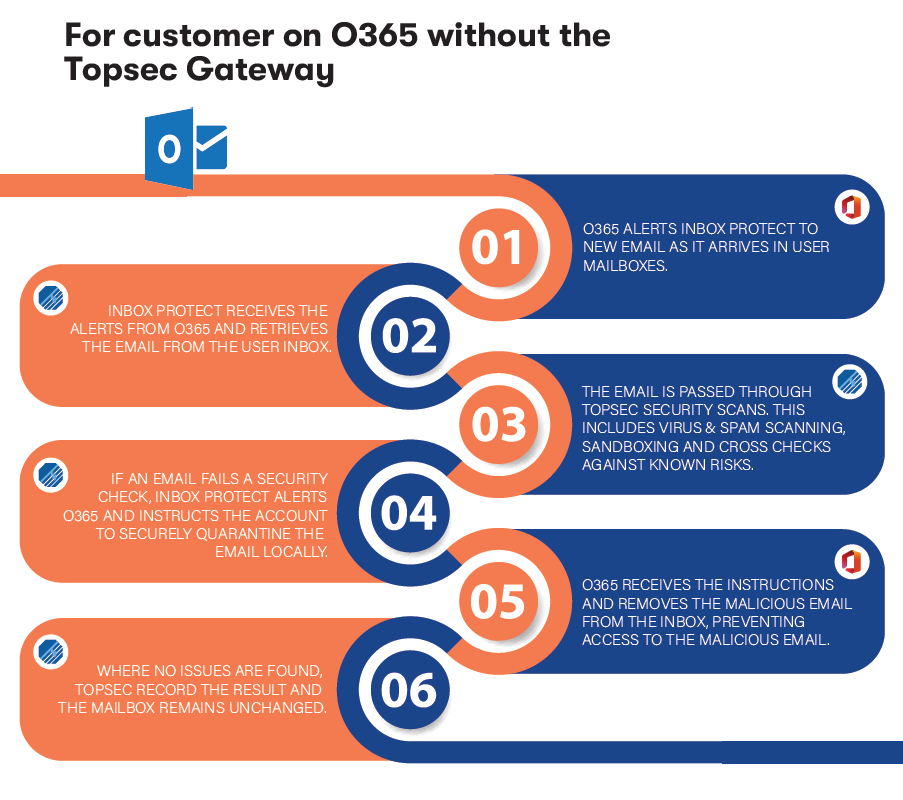
The security service for Office 365 users without a Topsec Gateway provides a multi-step approach to protect against email threats. When new emails arrive, Office 365 sends alerts, prompting Inbox Protect to retrieve and pass them through Topsec’s comprehensive security checks. These include virus and spam scanning, sandboxing, and cross-checking against known threats. If a security risk is detected, Inbox Protect directs Office 365 to quarantine the email, removing any malicious content from the user’s inbox. If no risks are found, the mailbox remains unchanged. This layered security process ensures a safer email environment by proactively handling and eliminating threats.
Benefits of Inbox Protect
Inbox and Subfolder Protection
Real-time Internal Mail Scanning
Attachment Virus Scanning
Spam Content Scanning
Known Bad Mail Address and Domain Check
URL Rewriting
Detailed URL Analysis
Secure your organisation's inbox in real time by signing our Topsec Inbox Protect.
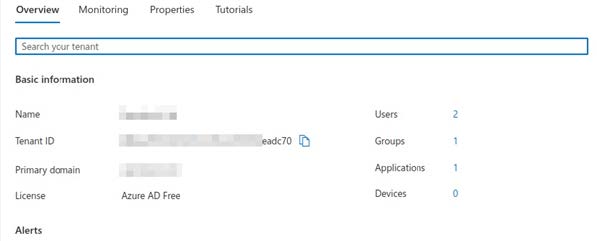
You will first need to obtain your Active Directory 'Tenant ID' from your Microsoft account; this can be found in the Microsoft 'Overview' tab.
2. Adding Tenant to Portal Account
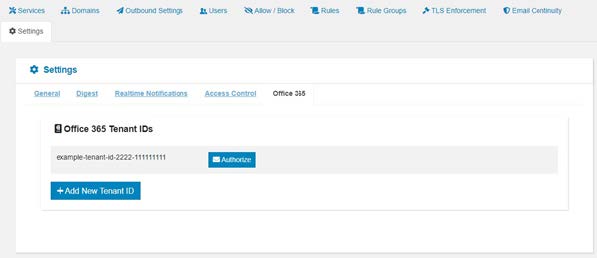
The tenant ID will need to be mailed to our support team (support@topsec.com). Once received we add the tenant to your portal account. With the tenant now added, you will be able to view the setup in the 'Setting/Office 365' tab of your portal account:
3. Authorizing Tenant Setup
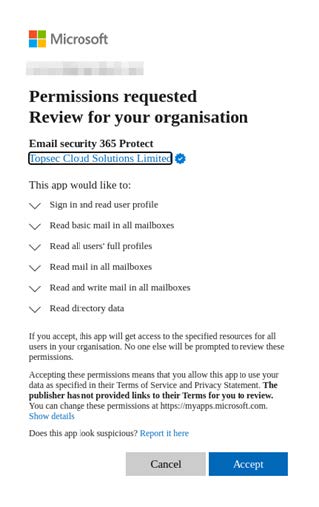
To provide permission to 'Topsec Inbox Protect', you will need to authorise the tenant setup by clicking the 'authorise' button. This will prompt a Microsoft login where permissions can be granted:
4. Activating Topsec Inbox Protect
Once acceppted, 'Topsec Inbox Protect' will be activated and functioning.
What Sets us Apart from Other Inbox Protect Providers
Advanced Threat Detection
Topsec uses cutting-edge technology to detect and block sophisticated threats, including zero-day attacks and advanced phishing schemes, ensuring comprehensive protection.
Protection contre l’usurpation d’identité VIP
Unique to Topsec, this service specifically guards against impersonation of high-level executives, protecting organizations from fraud and unauthorized actions.
Tailored Solutions
Topsec offers customizable security solutions that cater to the specific needs of different industries, including finance, healthcare, education, and government, providing targeted protection.
Local Expertise and Support
With a strong presence in Ireland and the UK, Topsec offers localized expertise and responsive customer support, ensuring that clients receive tailored assistance and guidance when needed.
Comprehensive Compliance Support
Topsec’s solutions are designed to help businesses comply with industry regulations, such as GDPR and HIPAA, with features like detailed reporting and audit trails.
Topsec Inbox protection provides a quick and easy setup to add an internal inbox for O365 users, which scans directly into user mailbox accounts, removing any threats and preventing interaction with potentially malicious mail.
Yes, it protects several built-in security capabilities like Machine Learning and AI, Behavioral Analysis, Link and Attachment Scanning, Anti-Spam and Anti-Malware Filters, etc.
By authorising a Microsoft Tenant to allow Topsec Inbox Protect to connect, our gateway scanning replicates within user mailboxes. Microsoft will notify Topsec Inbox Protect of any new internal mail. Protect will query the mailbox, retrieve it, and process it through our security scanners. Any mail that fails our scanning process will be removed from the user’s view and quarantined locally.